;'/%3e%3cg%20transform='matrix(79.126867,0,0,79.126867,64.802234,-14.324633)'%3e%3cpath%20d='M4,6L3,6L3,7L1,7L1,8L3,8L3,9L4,9L4,6ZM4,6L7,6L7,5L8,5L8,4L6,4L6,5L5,5L5,4L3,4L3,5L4,5L4,6ZM0,10L1,10L1,8L0,8L0,10ZM2,12L3,12L3,9L2,9L2,12ZM4,10L7,10L7,9L4,9L4,10ZM1,6L3,6L3,5L1,5L1,6ZM0,5L1,5L1,3L0,3L0,5ZM8,12L9,12L9,9L8,9L8,12ZM2,4L3,4L3,1L2,1L2,4ZM7,9L8,9L8,8L10,8L10,7L8,7L8,6L7,6L7,9ZM10,10L11,10L11,8L10,8L10,10ZM5,4L6,4L6,3L5,3L5,4ZM8,6L10,6L10,5L8,5L8,6ZM8,4L9,4L9,1L8,1L8,4ZM10,5L11,5L11,3L10,3L10,5Z'%20style='fill:rgb(19,236,91);fill-rule:nonzero;'/%3e%3c/g%3e%3c/svg%3e)
SQL Guide - Querying Databases with SQLite
This guide teaches you the fundamentals of SQL (Structured Query Language) for querying databases. These skills are essential for solving the SQL station challenges.
Table of Contents
- What is SQL?
- Basic SELECT Queries
- Filtering with WHERE
- Sorting and Limiting
- Combining Tables with JOIN
- Aggregation and Grouping
- Practical Examples
What is SQL?
SQL (Structured Query Language) is a language designed for managing and querying data stored in relational databases. Think of a database as a collection of spreadsheets (called tables), where each table has:
- Columns - The different types of data (like name, date, location)
- Rows - Individual records (each entry in the table)
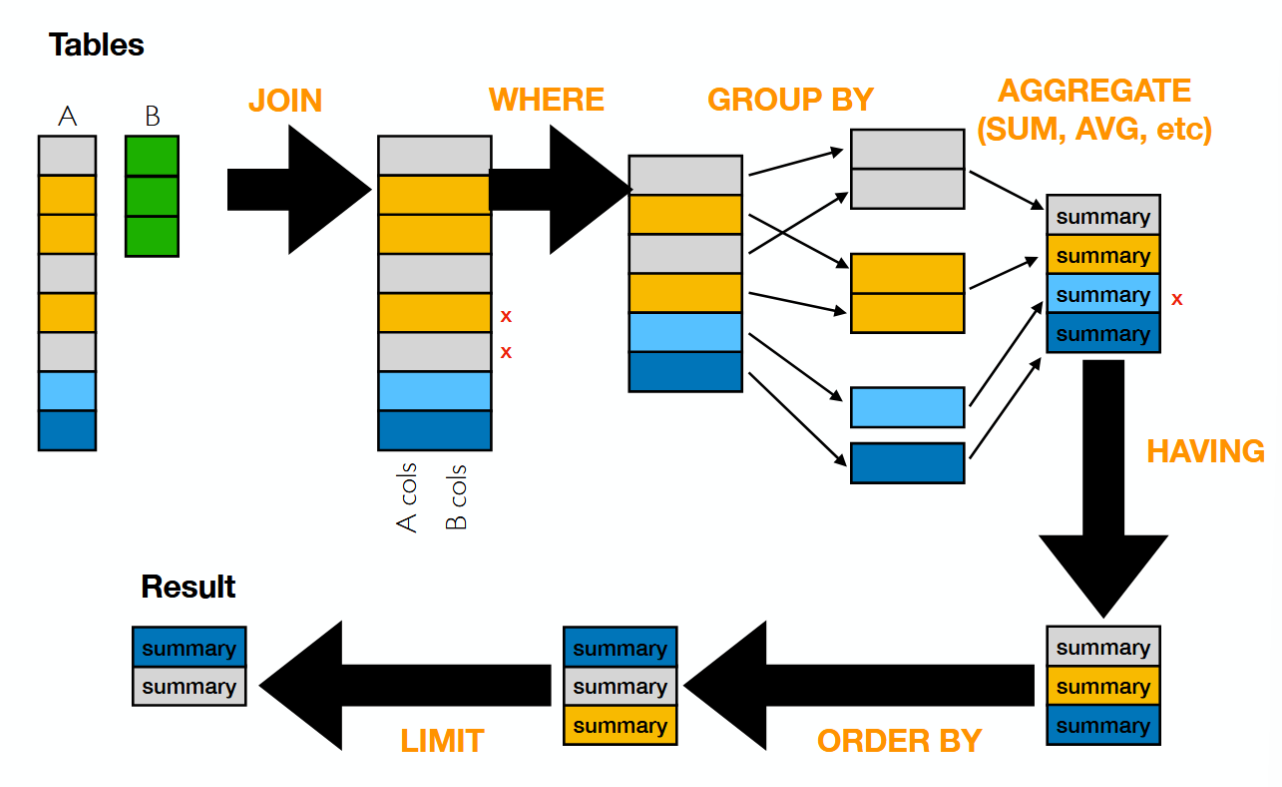
Here’s how the pieces of a SQL query fit together:
SQLite
SQLite is a lightweight database that stores all data in a single file. It’s perfect for applications that need a simple, embedded database without running a separate server.
Basic Terminology
| Term | Description |
|---|---|
| Table | A collection of related data organized in rows and columns |
| Column | A field in a table (like “name” or “date”) |
| Row | A single record in a table |
| Query | A request for data from the database |
| Primary Key | A unique identifier for each row |
| Foreign Key | A column that references a primary key in another table |
Basic SELECT Queries
The SELECT statement is how you retrieve data from a database.
Selecting All Columns
SELECT * FROM agents;The * means “all columns”. This query returns every column and every row from the agents table.
Selecting Specific Columns
SELECT name, codename FROM agents;Only returns the name and codename columns, making the output cleaner and faster.
Column Aliases
Rename columns in your output using AS:
SELECT name AS agent_name, codename AS alias FROM agents;Filtering with WHERE
The WHERE clause filters rows based on conditions.
Basic Comparisons
-- Exact match
SELECT * FROM agents WHERE status = 'active';

-- Not equal
SELECT * FROM agents WHERE status != 'inactive';

-- Numeric comparison
SELECT * FROM flights WHERE duration > 180;

-- Greater than or equal
SELECT * FROM locations WHERE timestamp >= '2025-01-01';
Multiple Conditions
Combine conditions with AND and OR:
-- Both conditions must be true
SELECT * FROM agents
WHERE status = 'active' AND clearance_level >= 5;

-- Either condition can be true
SELECT * FROM flights
WHERE origin = 'NYC' OR destination = 'NYC';

-- Complex combinations (use parentheses for clarity)
SELECT * FROM agents
WHERE (status = 'active' OR status = 'undercover')
  AND clearance_level >= 3;
Pattern Matching with LIKE
Use LIKE for partial text matching:
-- Starts with "John"
SELECT * FROM agents WHERE name LIKE 'John%';

-- Ends with "son"
SELECT * FROM agents WHERE name LIKE '%son';

-- Contains "mission"
SELECT * FROM logs WHERE description LIKE '%mission%';%matches any sequence of characters_matches exactly one character
Checking for NULL
NULL represents missing or unknown data. Use IS NULL or IS NOT NULL:
-- Find agents without an assigned handler
SELECT * FROM agents WHERE handler_id IS NULL;

-- Find agents with assigned handlers
SELECT * FROM agents WHERE handler_id IS NOT NULL;
IN Operator
Check if a value is in a list:
SELECT * FROM flights
WHERE destination IN ('NYC', 'LAX', 'ORD');
BETWEEN Operator
Check if a value is within a range:
SELECT * FROM logs
WHERE timestamp BETWEEN '2025-01-01' AND '2025-01-31';
Sorting and Limiting
ORDER BY
Sort results by one or more columns:
-- Ascending order (default)
SELECT * FROM agents ORDER BY name;

-- Descending order
SELECT * FROM flights ORDER BY departure_time DESC;

-- Multiple columns
SELECT * FROM logs ORDER BY agent_id, timestamp DESC;
LIMIT
Restrict the number of results:
-- Get only the first 10 rows
SELECT * FROM flights LIMIT 10;

-- Skip first 5 rows, then get next 10
SELECT * FROM flights LIMIT 10 OFFSET 5;
Combining ORDER BY and LIMIT
Find the most recent events:
-- Get the 5 most recent log entries
SELECT * FROM logs
ORDER BY timestamp DESC
LIMIT 5;
Combining Tables with JOIN
JOINs connect data from multiple tables based on related columns. This is one of the most powerful features of SQL.
Understanding Relationships
Tables are often related through shared columns:
- An
agentstable might have anidcolumn - A
flightstable might have anagent_idcolumn that referencesagents.id
INNER JOIN
Returns only rows where there’s a match in both tables:
SELECT agents.name, flights.destination, flights.departure_time
FROM agents
INNER JOIN flights ON agents.id = flights.agent_id;
This query:
- Looks at each agent
- Finds all their flights (where
agent_idmatches) - Returns combined data from both tables
Simplified JOIN Syntax
INNER JOIN can be written as just JOIN:
SELECT agents.name, flights.destination
FROM agents
JOIN flights ON agents.id = flights.agent_id;
Table Aliases
Make queries shorter with aliases:
SELECT a.name, f.destination, f.departure_time
FROM agents a
JOIN flights f ON a.id = f.agent_id;
LEFT JOIN
Returns all rows from the left table, even if there’s no match:
SELECT agents.name, flights.destination
FROM agents
LEFT JOIN flights ON agents.id = flights.agent_id;
Agents without any flights will still appear, with NULL for flight columns.
Multiple JOINs
Chain multiple JOINs to connect several tables:
SELECT a.name, f.flight_number, l.city
FROM agents a
JOIN flights f ON a.id = f.agent_id
JOIN locations l ON f.destination_code = l.code;
JOIN with WHERE
Filter joined results:
SELECT a.name, f.destination
FROM agents a
JOIN flights f ON a.id = f.agent_id
WHERE f.departure_time > '2025-01-15'
  AND a.status = 'active';
Aggregation and Grouping
Aggregate Functions
Perform calculations on sets of rows:
| Function | Description |
|---|---|
COUNT() | Number of rows |
SUM() | Total of numeric values |
AVG() | Average of numeric values |
MIN() | Smallest value |
MAX() | Largest value |
-- Count all agents
SELECT COUNT(*) FROM agents;

-- Count active agents
SELECT COUNT(*) FROM agents WHERE status = 'active';

-- Average flight duration
SELECT AVG(duration) FROM flights;

-- Find the longest flight
SELECT MAX(duration) FROM flights;
GROUP BY
Group rows that share a value and aggregate each group:
-- Count agents by status
SELECT status, COUNT(*) as count
FROM agents
GROUP BY status;

-- Total flight hours per agent
SELECT agent_id, SUM(duration) as total_hours
FROM flights
GROUP BY agent_id;
HAVING
Filter groups (like WHERE but for aggregated data):
-- Find agents with more than 5 flights
SELECT agent_id, COUNT(*) as flight_count
FROM flights
GROUP BY agent_id
HAVING COUNT(*) > 5;
Practical Examples
Example 1: Find Where Someone Was at a Specific Time
SELECT l.city, l.building, l.timestamp
FROM agents a
JOIN locations l ON a.id = l.agent_id
WHERE a.name = 'John Smith'
  AND l.timestamp BETWEEN '2025-01-15 00:00:00' AND '2025-01-15 23:59:59'
ORDER BY l.timestamp;
Example 2: Find All Flights to a Destination
SELECT a.name, f.flight_number, f.departure_time
FROM agents a
JOIN flights f ON a.id = f.agent_id
WHERE f.destination = 'NYC'
ORDER BY f.departure_time DESC;
Example 3: Find Agents in the Same Location
SELECT DISTINCT a.name, l.city, l.timestamp
FROM agents a
JOIN locations l ON a.id = l.agent_id
WHERE l.city = 'New York'
  AND l.timestamp >= '2025-01-15'
ORDER BY l.timestamp;
Example 4: Cross-Reference Two Data Sources
-- Find agents who were in NYC when a specific flight arrived
SELECT DISTINCT a.name, a.codename
FROM agents a
JOIN locations l ON a.id = l.agent_id
JOIN flights f ON a.id = f.agent_id
WHERE l.city = 'New York'
  AND f.destination = 'NYC'
  AND l.timestamp BETWEEN f.arrival_time AND datetime(f.arrival_time, '+2 hours');
Example 5: Find the Most Frequent Travelers
SELECT a.name, COUNT(f.id) as flight_count
FROM agents a
JOIN flights f ON a.id = f.agent_id
GROUP BY a.id
ORDER BY flight_count DESC
LIMIT 10;
Tips & Best Practices
- Start simple - Build queries incrementally. Start with SELECT *, then add WHERE, then JOIN
- Use table aliases - Makes complex queries more readable (
afor agents,ffor flights) - Check your JOINs - Make sure you’re matching the right columns
- Test with LIMIT - Add
LIMIT 10while testing to avoid huge result sets - Read error messages - SQL errors usually tell you exactly what’s wrong
- Mind your quotes - Use single quotes for strings (
'value'), not double quotes
Common Pitfalls
❌ Forgetting quotes around strings
SELECT * FROM agents WHERE name = John; -- Error!✅ Correct
SELECT * FROM agents WHERE name = 'John';❌ Using = for NULL comparison
SELECT * FROM agents WHERE handler_id = NULL; -- Won't work!✅ Correct
SELECT * FROM agents WHERE handler_id IS NULL;❌ Ambiguous column names in JOINs
SELECT name, city FROM agents JOIN locations ON id = agent_id; -- Which id?✅ Correct
SELECT a.name, l.city FROM agents a JOIN locations l ON a.id = l.agent_id;Quick Reference
-- Basic query structure
SELECT columns
FROM table
WHERE conditions
ORDER BY column
LIMIT number;

-- JOIN structure
SELECT columns
FROM table1
JOIN table2 ON table1.column = table2.column
WHERE conditions;

-- Aggregation structure
SELECT column, COUNT(*)
FROM table
GROUP BY column
HAVING COUNT(*) > value;

-- Common operators
=, !=, <, >, <=, >=      -- Comparison
AND, OR, NOT              -- Logical
LIKE '%pattern%'          -- Pattern matching
IN (value1, value2)       -- List membership
BETWEEN val1 AND val2     -- Range
IS NULL, IS NOT NULL      -- NULL checks